
Compatibility
Minecraft: Java Edition
Platforms


Links
Tags
Creators
Details
Licensed MIT
Published 2 days ago
Updated yesterday
Introduction
This datapack makes configuring the Chest Minecart GUI simpler and more convenient. You only need to configure the storage and execute the generation function to quickly create a GUI.
Features
The following feature is supported:
- Click an item to execute a command / switch menus
Storage Structure
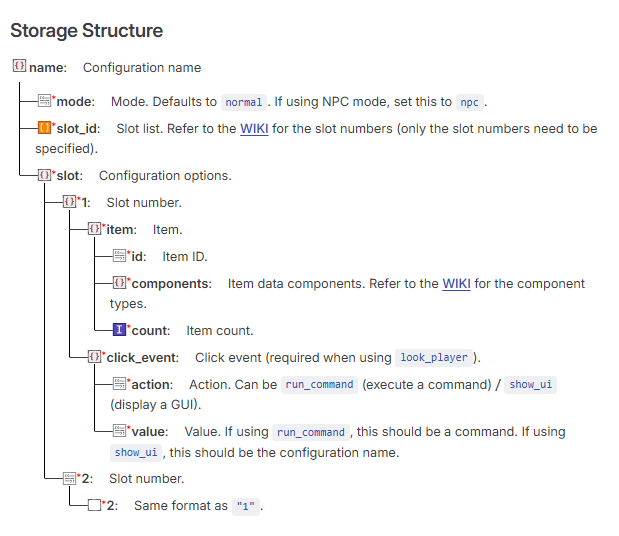
Example Storage
Default configuration
data merge storage windwaves_sea:chest_gui {\
config:{\
    "test":{\
        "mode":"npc",\
        "slot_id":["1"],\
        "slot":{\
                "1":{\
                    "item":{\
                        "id": "minecraft:diamond",\
                        "components":{},\
                        "count": 1 \
                    },\
                    "click_event":{\
                        "action":"show_ui", \
                        "value":"test1" \
                    }\
                }\
        }\
    }\
}\
}
Command Reference
Generate a Chest Minecart GUI
function chest_gui:command/summon {name:"name",x:1,y:1,z:1}
Generates a Chest Minecart GUI. The configuration must be written to storage first. name is the configuration name defined above (and used throughout the following commands). x, y, and z are coordinate values.
Remove a Chest Minecart GUI
function chest_gui:command/remove {name:"name"}
Delete a Configuration (Also Removes the Chest Minecart GUI)
function chest_gui:command/delete_setting {name:"name"}
Download
QQ Group: 117464315
Github: https://github.com/WindWavesSea/Chest-Minecart-GUI/
Modrinth: https://modrinth.com/datapack/chest-minecart-gui/
Credits
Thanks to NOX OBSCURA for providing the minecart opening detection concept.